Atlassian Solution

Marketing and Sales CRM on Jira Service Management (JSM)

Marketing and Sales teams often need CRM-like structure without adding another silo.

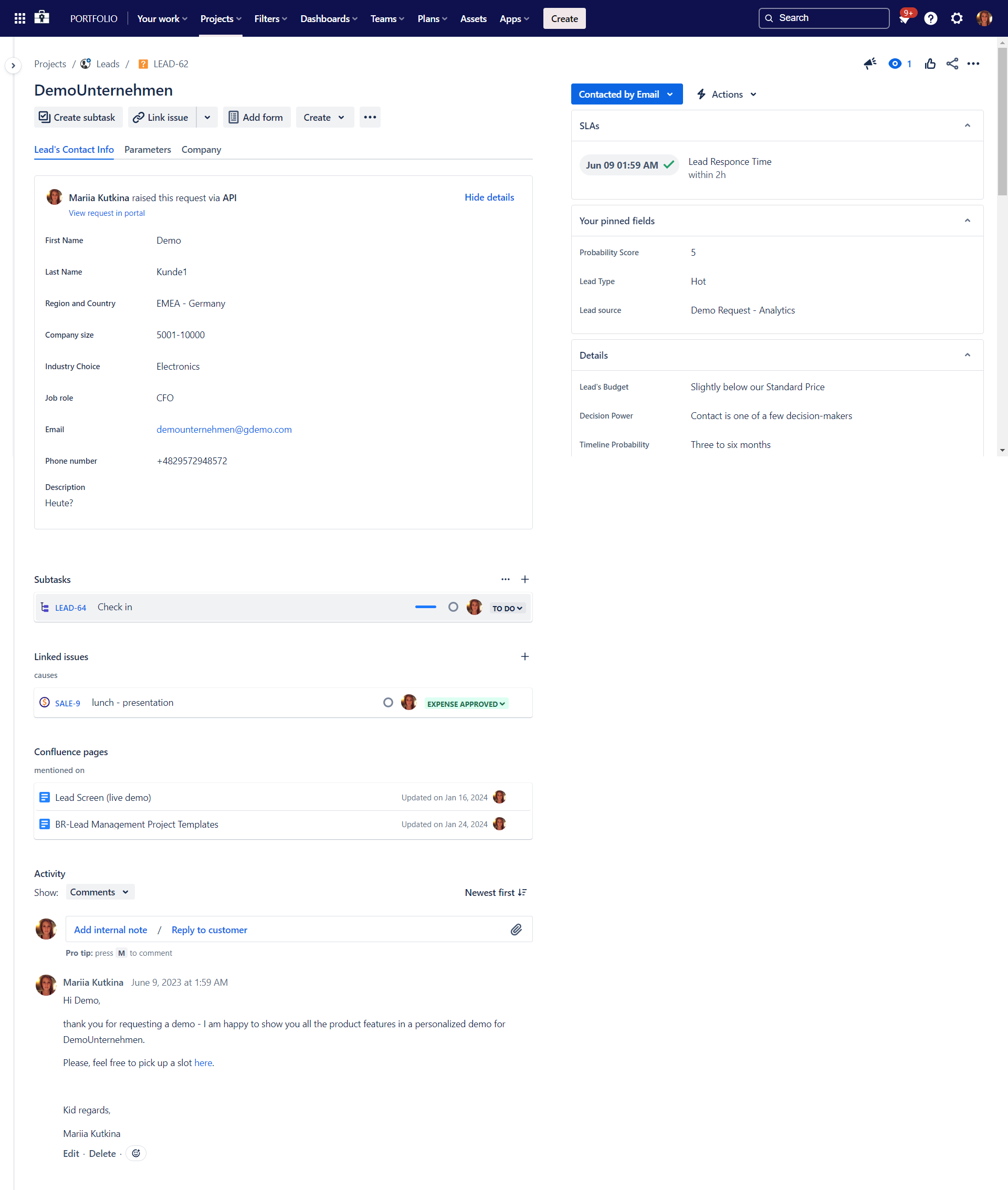
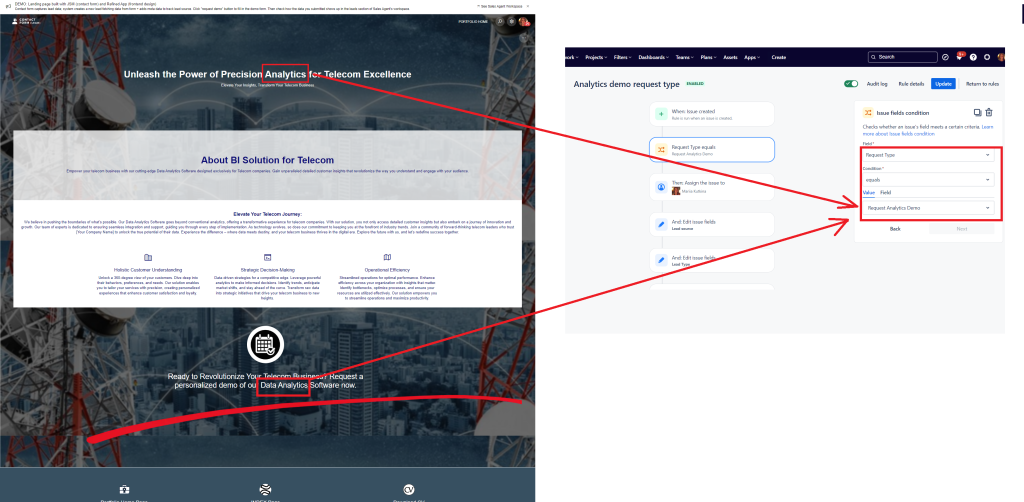
Lead & Request Intake JSM Portal Form

This solution delivers a Marketing and Sales CRM on Jira Service Management and Jira by centralizing intake, qualification, pipeline execution, customer-facing requests, documentation, and reporting.

This solution typically combines:

  • Jira Service Management (JSM) for external/internal request intake via portal, request types, queues, and SLAs

  • Jira for pipeline execution using Kanban boards and team-friendly views

  • Confluence for playbooks, campaign documentation, FAQs, and knowledge base content connected to the service portal

  • EazyBI for scalable analytics, dashboards, and executive reporting from Jira data

  • Optional: Assets in JSM Premium/Enterprise to model structured objects (e.g., accounts, subscriptions, contracts, products, territories) when a shared data registry is required

Read articles about Marketing and Sales CRM on Jira Service Management

Why This Matters: Challenges We Solve

Leads and requests arrive through too many channels

Email, forms, chat, and spreadsheets create missed follow-ups and inconsistent qualification.

Marketing → Sales handoffs are unclear

MQL/SQL transitions lack ownership, SLAs, and traceability across teams and regions.

Pipeline visibility is unreliable

Opportunity status is updated inconsistently, making forecasts and prioritization low-confidence.

Approvals and compliance slow work down

Campaign launches, discounts, and legal reviews rely on manual chasing and non-auditable approvals.

Customer/partner requests don’t fit “IT ticketing” tools

Sales support, proposals, onboarding questions, and partner requests need a branded, structured intake experience.

Reporting becomes a manual consolidation effort

Leadership dashboards require exporting data and reconciling sources instead of using one analytics layer.

Core Features of Marketing and Sales CRM on Jira Service Management (JSM)

1) CRM Data Model in Jira (Leads, Accounts, Opportunities, Campaign Work)

A practical CRM model is implemented using Jira issue types and fields to represent:

  • Leads (source, region, product interest, qualification stage)

  • Opportunities (value, close date, probability, next action)

  • Accounts / customers (ownership, segment, renewal date)

  • Marketing work (campaigns, assets, approvals, deliverables)

Where a shared reference dataset is needed (accounts/contracts/products), Assets in JSM Premium/Enterprise can provide structured objects and relationships that can be selected in requests and linked to work items.

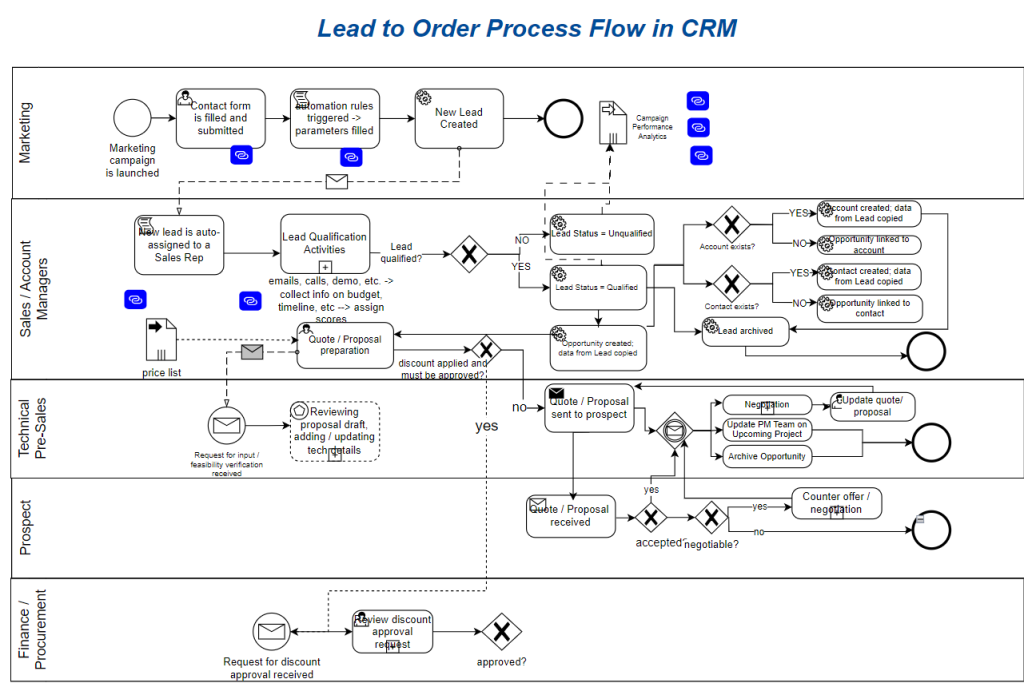
Lead to Order BPMN process diagram

Lead & Request Intake via JSM Portal

Lead & Request Intake via JSM Portal

2) Lead & Request Intake via JSM Portal (Forms, Request Types, Routing)

JSM supports a customer-style help center experience with customizable request types grouped for easy navigation.
Common portals include:

  • “Request a demo / contact sales”

  • “Partner request”

  • “Pricing/discount approval”

  • “Sales enablement request”

  • “Marketing creative request”

  • “Campaign launch intake”

Requests are routed into queues for triage and assignment, enabling consistent handling at scale.

3) SLAs for Lead Response and Sales Support Commitments

SLAs can be configured in Jira Service Management to set goals for how quickly requests are handled (for example, time to first response and resolution).
Typical business SLAs include:

  • Lead response time by region (e.g., within 1 business hour)

  • Partner inquiry response time

  • Pricing approval turnaround time

  • Customer onboarding request completion targets

Lead & Request Intake JSM Portal Form

Lead & Request Intake via JSM Portal

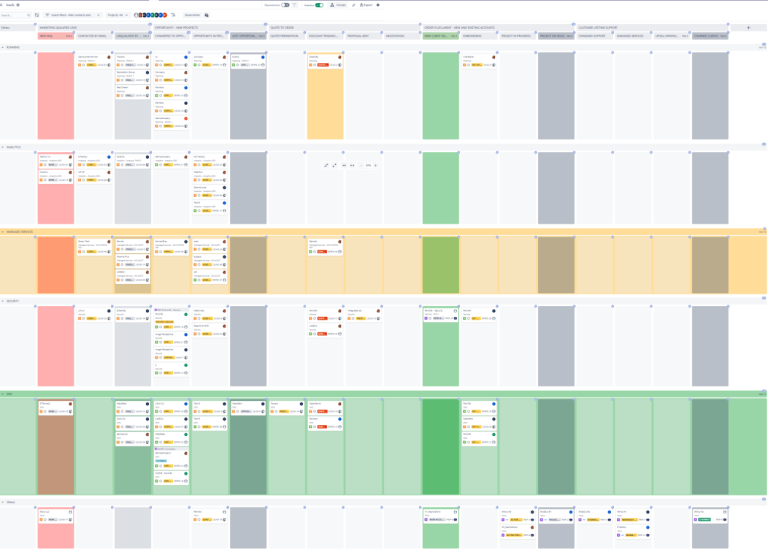
Shared Sales and Marketing Kanban Boards Template in JSM

Shared Sales and Marketing Kanban Boards Template with Atlassian Jira

4) Pipeline Execution with Kanban Boards and Multiple Views

Sales and marketing operations benefit from visual execution:

  • Kanban boards for lead qualification, opportunity progression, and campaign delivery flow

  • Views that support different stakeholders (agents, managers, executives)

Within JSM, work can be visualized as list, board, or calendar views to suit different operating styles.

5) Confluence for Enablement, Documentation, and Self-Service

Confluence becomes the system of record for:

  • Sales playbooks, discovery scripts, and proposal templates

  • Campaign briefs, checklists, and launch criteria

  • Pricing/discount policies and approval guidance

  • Partner onboarding packs and FAQs

A JSM knowledge base can be connected so users can self-serve via articles in the help center instead of raising requests.

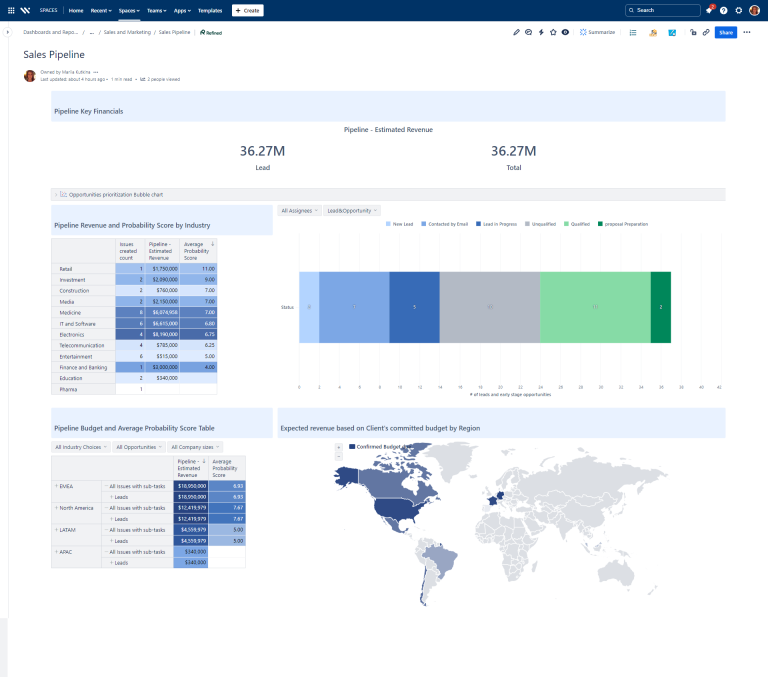
Confluence Enabled CRM on JSM Reporting

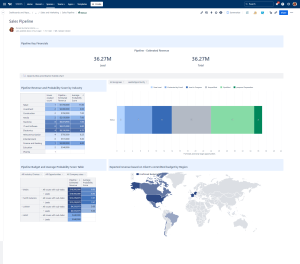
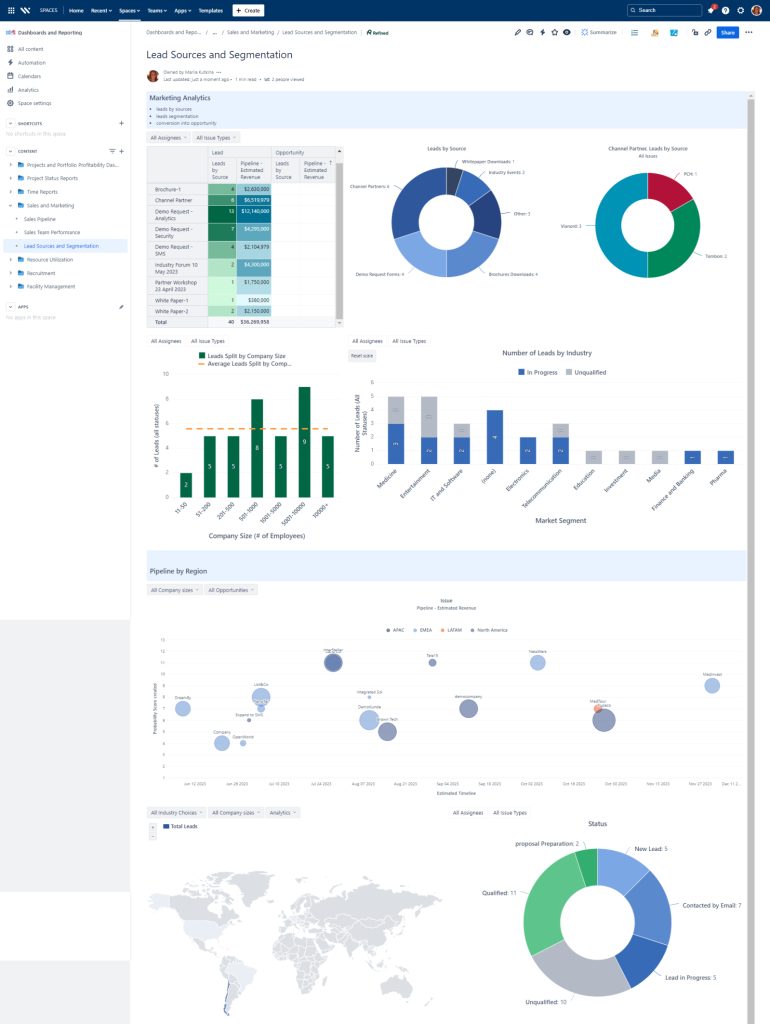
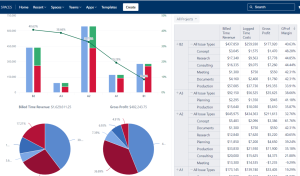
Leads Dashboard with EazyBI - Data pulled from CRM on Jira Service Management

Leads Reporting with eazyBI - CRM on Jira Service Management

6) Executive Reporting with eazyBI (Dashboards, Trends, Rollups)

EazyBI provides a scalable reporting layer for Jira, enabling custom dashboards across teams, projects, and historical states.
Common analytics include:

  • Lead response and SLA compliance by region/team

  • Funnel conversion by source and segment

  • Pipeline aging and stage distribution

  • Marketing throughput and campaign cycle times

  • Sales support workload, backlog, and bottlenecks

Reports can be published to Jira dashboards, and can also be shared in Confluence with the appropriate setup.

How It Works: Solution Architecture

Atlassian Platform Foundation

Jira + Jira Service Management + Confluence + EazyBI + JSM Assets for shared data objects (optional)

Connected Lifecycle

Intake (portal/forms) → routing (queues) → qualification/workflow → pipeline execution (boards/views) → documentation (Confluence) → analytics (EazyBI dashboards).

Governance That Scales

Role-based workflows, approval steps, and audit trails embedded into Jira/JSM configuration so growth does not create chaos.

Templates Included into Marketing and Sales CRM on Jira Service Management (JSM)

Consulting Services Related to Marketing and Sales CRM on Jira Service Management (JSM)

FAQ about Marketing and Sales CRM on Jira Service Management (JSM)

A common enterprise pattern is a shared global intake taxonomy (request types, mandatory fields, routing rules) with regional queues, localized forms, and region-specific SLAs—so reporting stays consistent while operations stay practical.

SLAs in JSM can be tied to key workflow statuses and ownership changes, making response-time performance visible and measurable across handoff points.
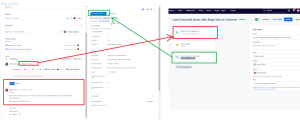
SLAs for Lead Response CRM on JSM

A scalable approach uses structured fields for next action/due date, automated reminders based on inactivity, and board policies that prevent work from aging unnoticed—so the system drives consistency.
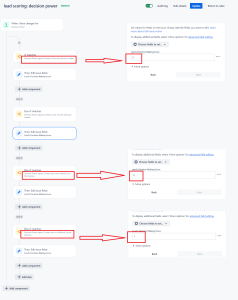
Lead Score (BANT) Component Added Automation Rule

Separate request catalogs and queues keep workstreams distinct, while shared reporting dimensions (region, product line, segment, priority) enable consolidated leadership visibility.


Enterprise setups typically use role-based permissions, restricted fields, and controlled sharing views so sales leadership has transparency without exposing sensitive customer attributes to broad audiences.


Assets becomes valuable when a structured registry is needed (accounts/products/subscriptions/contracts) that can be linked to requests and work items, and maintained as a single reference dataset—available in JSM Premium/Enterprise.


Contact me for a free consultation!